
Drumroll, please … IGNITION 8.3.0 HAS OFFICIALLY ARRIVED! The future of industrial automation is finally here, and it’s running in real time.
More than ever, this version of Ignition has “open” coded in its DNA, and it will empower you to do more with your data, scale swiftly, unify operations, customize easily, and rapidly build next-generation applications. 8.3 marks the beginning of a new era in industrial software, and is hands-down the world’s most advanced industrial integration platform for SCADA systems, MES, HMI, IIoT, and more.
So let’s unpack this technological bounty and explore the world of opportunities 8.3 opens up. With this major release, there are so many new features that the release train had to get reinforced steel plating to carry them all, so you might want to make yourself comfortable!
A Universal Historian Solution
In 8.3.0, you’ll be able to launch your time-series data history solutions into the future with a new historian system that includes a Historian Core Module and a SQL Historian Module.
The Historian Core Module contains the built-in Core Historian, which is an unparalleled historian product unlike any we’ve offered before. This QuestDB-powered historian requires zero database configurations, so as soon as you create a historian you can start using it immediately. It offers native data aggregation, archiving, deduplication, partitioning, data aliasing, and metadata support. Additionally, it brings more power to your history solutions, storing and querying data up to 10 times faster than Ignition’s previous internal tag history provider.
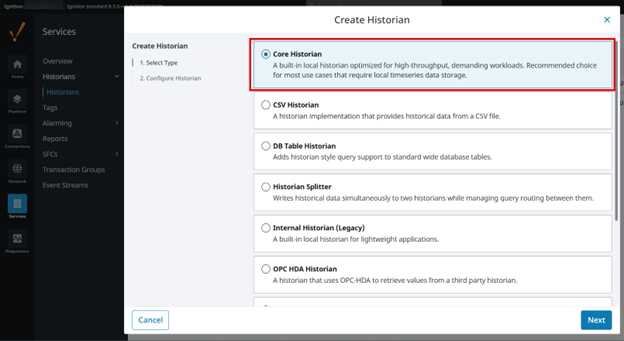
This module also contains a library of historian tools, including tools for rich data modeling, metadata storage, and leveraging data sources (like CSV files and database tables) as read-only historians, plus a data splitter, simulator, and more. Additionally, you get a streamlined, modern Historian API, which enables module authors to create custom historians for any use case, with any technology. Lastly, the legacy Internal Historian – SQLite is also included.
The other module in 8.3’s historian solution is the SQL Historian Module, which enables you to integrate Ignition with external SQL databases to create a high-performance historian. This SQL Historian is ideal for large-scale storage of historical information, and it automatically supports compression, partitioning, interpolation, and aggregation for any SQL database.
With the abundance of options in 8.3’s historian solution, you get the flexibility to choose the ideal historian for your needs. And soon we’ll be releasing even more historian types, which will expand your options even further.
Event Streams
With 8.3.0 also comes a new way to map event-driven data from a variety of sources, faster and easier than ever: the Event Streams Module.
Event Streams is extremely helpful for building complex event-driven architectures, enabling you to connect and manage data from external sources, all in one central place. You can use this exciting new tool to create data endpoints from tags, SQL databases, REST APIs, IIoT services, cloud providers, and other sources. And you’ll have the ability to map, filter, and route data between subsystems, so you can set up actions (like reacting to a change in a tag, for example) without having to write a bunch of code. Plus you can easily publish data to event brokers, message queues, buses, and more. And to make things super simple, there is just a single, drag-and-drop interface to accomplish all these tasks.

This new addition to Ignition is a powerful tool to help you build modern automation applications with real-time data pipelines, centralize events management, gain more flexibility for your data, and harness the full power of your data in a simple, elegant way.
Drawing Editor
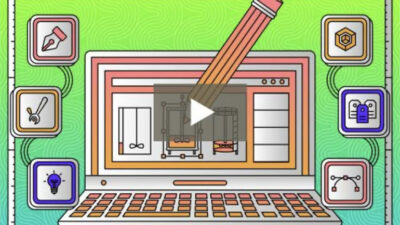
In 8.3.0, Perspective is upgraded with a new state-of-the-art Drawing Editor that will unleash your creativity so you can design like a true automation artist. The new Drawing Editor also streamlines your workflow, with the ability to create, edit, and animate vector graphics natively in Ignition’s designer.
As a first-class vector illustration interface, the Drawing Editor provides functionality like snapping, guides, fill & stroke, path, layering, and more. Also, rather than having to use external software, you can access a library of controls in Ignition that cover SVG’s wide range of capabilities to create vector graphics. And you can also make edits to your library of SVGs right in the designer, such as adding or removing elements, changing colors, or modifying stroke weights. Plus you can easily bring your graphics to life, with the ability to bind graphics to live data tags (or other dynamic sources).
With the abundance of functionality and customizability in the new Drawing Editor, it’s easier than ever to design bespoke HMIs and dashboards, and you’ll be fully equipped to take the user experience for your solutions to an entirely new level.
Sponsored content by Inductive Automation