Get tips from the instructors of the Aug. 13 RCEP Control Engineering webcast, “How to integrate new HMI or SCADA with existing automation,” archived for a year.

HMI, SCADA integration insights
- Get a sneak peek of the Control Engineering webcast, “How to integrate new HMI or SCADA with existing automation,” with advice, tips and best practices from two control system integration experts.
- Jason Israelsen, PE, is a project group lead at APCO Inc. Isaac Novosad is automation engineer at Huffman Engineering Inc.
- Preview tips on HMI and SCADA integration includes best practices and examples.
Human-machine interface (HMI) and supervisory control and data acquisition (SCADA) software modernization or upgrades require integration into existing systems. Need an inside look on how to integrate HMI and SCADA software? Get a sneak peek of the Control Engineering webcast, “How to integrate new HMI or SCADA with existing automation,” with advice, tips and best practices from two control system integration experts. The webcast, for one professional development hour upon successful exam completion, will be archived until Aug. 13, 2027. Registrants listening live will have the opportunity to ask the instructors questions after the presentation.
If you’re working on an HMI/SCADA modernization project, it may be helpful to:
- Evaluate legacy systems and identify integration requirements for deploying new HMI or SCADA solutions.
- Apply best practices for connecting new interface systems to existing programmable logic controllers (PLCs), other controllers, and field devices using standard protocols and network architectures.
- Develop risk-mitigated migration strategies using offline testing, simulation environments and phased deployment techniques.
- Incorporate essential cybersecurity, usability and data access considerations when implementing new HMI/SCADA with legacy systems.
Expert instructors (Figure 1) for the HMI/SCADA integration course (and advice below) are:
- Jason Israelsen, PE, is a project group lead at APCO with over a decade of experience improving system efficiencies in the water and wastewater industries. His specialties include SCADA, HMI, and PLC programming, control panel CAD design, and control system commissioning. He holds BS and MS degrees in Mechanical Engineering from the University of Utah and is a licensed PE in Control Systems.
- Isaac Novosad, automation engineer, is known for his ability to grasp complex issues quickly and simplify them for efficient controls implementation. As part of the Huffman Engineering Inc. team, he is a recognized resource for the utilities and the industrial-focused group, especially skilled at HMI and SCADA design. Past project work includes Phase III Chemical Building Improvements involving SCADA programming and system platform development as a member of a global pharmaceutical team. He is working with a large municipality and a 12-phased system shutdown to convert HMI and SCADA systems.
More than graphics, it’s the connection and data
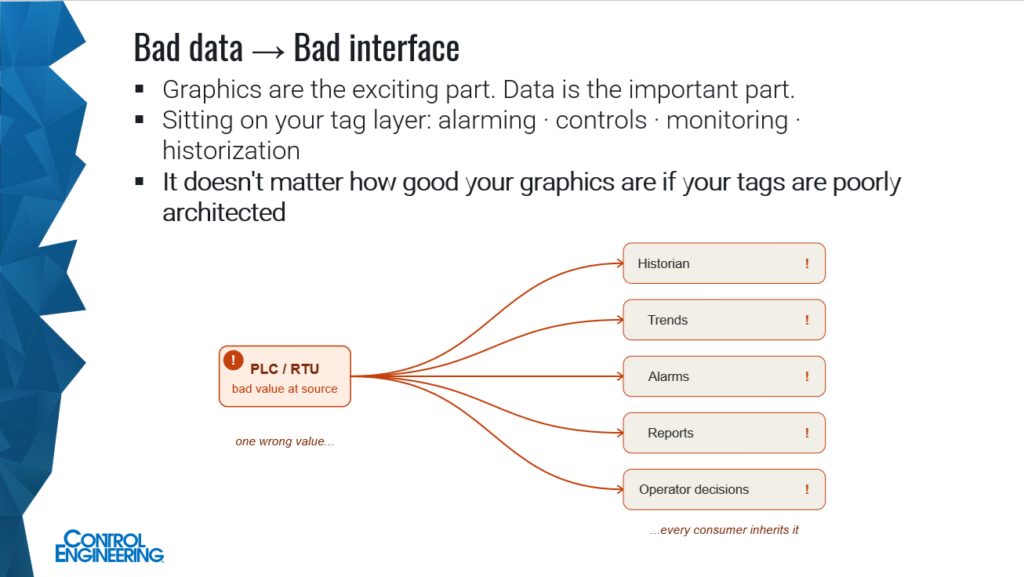
“Probably the most important thing to keep in mind,” Israelsen said, is that while “it’s exciting to focus on the graphics … the connection and the data are what matter.” Alarming, controls, monitoring and historization all sit on that layer (Figure 2).
“It doesn’t matter how good your graphics are if your tags are poorly architected,” Israelsen said.
With tag architecture, during a full migration, it can be “genuinely difficult to know how to move things from system A to system B. You’ll want a precedent — a checklist or a procedure. Addressing is often approached differently between systems,” he said
That can include mapping of values, data types, byte and word order, scaling, read/write functions, poll rates and timeouts, he said.
“I recommend migrating with some type of function or script — a consistent method rather than by hand. You will still have to get in and resolve things by hand. But there are thousands and thousands of details, and asking a human to catch every single one every time is a very big ask. Even if you only consistently migrate a portion of it, that’s a portion where a person can go in and verify rather than transcribe.”
Verification is mandatory, not: “Yeah, it looks like things are good.” A defined process needs to confirm that things work.
“Before you cut over, ensure the old tag database is exported, the driver and gateway configuration is saved, the previous HMI or SCADA project is archived and the PLC firmware revision you were on is written down. Firmware updates are particularly easy to treat as one-way.
SCADA implementation best practices
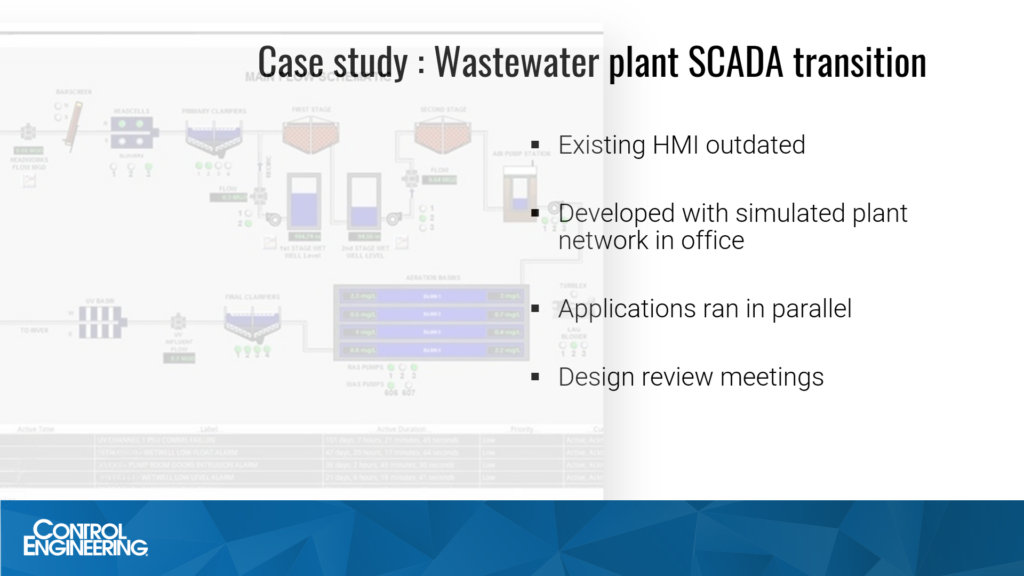
Novosad describes a wastewater treatment plant SCADA (Figure 3) that observed the whole facility. This SCADA ran on an old computer, running on proprietary software that very few people knew. They needed to replace it with a more modern SCADA solution, unable to make changes anymore.
In creating a new SCADA, “we aimed to minimize the number of things we’d need to fix onsite by developing the new SCADA on a simulated plant network in our office, using virtual machines connected to real PLCs loaded with the real programs from the plant,” Novosad said.
In a phased approach to development, during each phase, “we developed screens for one building at the plant. We also had design review meetings with interested parties before the implementation of each phase. And we brought up the new SCADA in parallel with the old one on a set of new servers.
“Onsite, we compared each of the values on the screen of the old SCADA computer with the values on the new screens. And we determined that this was an appropriate level of testing because the SCADA was observation-only – it had no controls, and we had no access to the original development environment,” Novosad said.
“At the end of the project, we decommissioned the old SCADA computer and gave some training to the plant operators, but they were actually already pretty familiar with the system as they had been working with it as we had been implementing it,” Novosad said.
The new SCADA provided visibility beyond the plant to include the rest of the city’s wastewater system, he added.
For more instructor advice, attend the live webcast or archived version, before your next HMI or SCADA integration.
Mark T. Hoske is editor-in-chief, Control Engineering, Arrowfly, [email protected].
Keywords
HMI integration, SCADA integration, HMI upgrades
Consider this
Need a PDH? Need information about HMI and SCADA integration?
You also might like
Also read from Control Engineering
Roundtable: SCADA’s role in industrial control
https://www.controleng.com/roundtable-scadas-role-in-industrial-control/